

Registration of legal entities in the "Electronic Court" system becomes mandatory
27/11/23
Due to the introduction of amendments to the Law No.3200-IX the registration of legal entities in the "Electronic Court" system becomes mandatory:
- as of October 18, 2023 for the purposes of commercial proceedings
- as of February 20, 2024 for the purposes of civil and administrative proceedings.
The consequences of non-registration of a legal entity in an Electronic Court are: leaving motionless claims, appeals and cassation appeals and returning them; leaving applications and petitions on procedural issues without consideration; failure to consider statements on the merits of the dispute.
In order to avoid negative procedural consequences in current court cases, as well as to receive timely court notice about initiation of court cases with your participation, we recommend to register your legal entity in the "Electronic Court" system.
You may find a brief step-by-step instruction on registration in the "Electronic Court" below.
Step 1. Follow the link to the registration or login page.

Step 2. Authorize with a qualified electronic signature (QES) of the head (director) of your legal entity.

On the registration page select a tab according to the type of QES and read the key. Please note that consent to the processing of personal data must be provided.


Step 3. Enter the data.
- the field "Taxpayer Identification Numbers/ Code in National State Registry of Ukrainian Enterprises and Organizations" and "Company name/Name of the head" are filled automatically
- specify the date of birth of the head of the company or the date of the company registration
- enter your email address and phone number (the indicated contacts will be used to send correspondence regarding all court cases of the company. There can be only one contact for the entire company)
- confirm your email address (enter the code that came to the indicated email address in a separate email (if you have not received the code, check the "Spam" folder)
- click the "I AGREE WITH THE TERMS OF E-CABINET SERVICE USAGE" button and the "CONFIRM" button at the end of the registration form.

Step 4. Powers of responsible persons (option).
If necessary, you can authorize responsible employees or external consultants to conduct and monitor your company's legal cases. The granting of such a power of attorney can be carried out both for a separate court case and for all company cases.
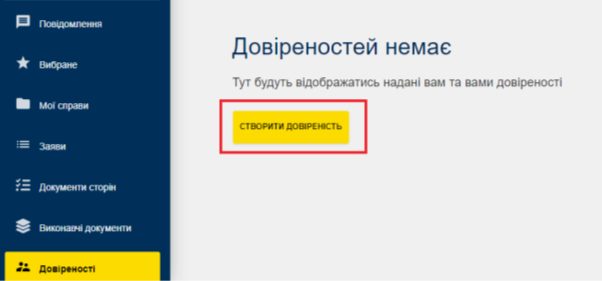
In order to do this, go to the section "POWER OF ATTORNEY":
- click "CREATE POWER OF ATTORNEY"
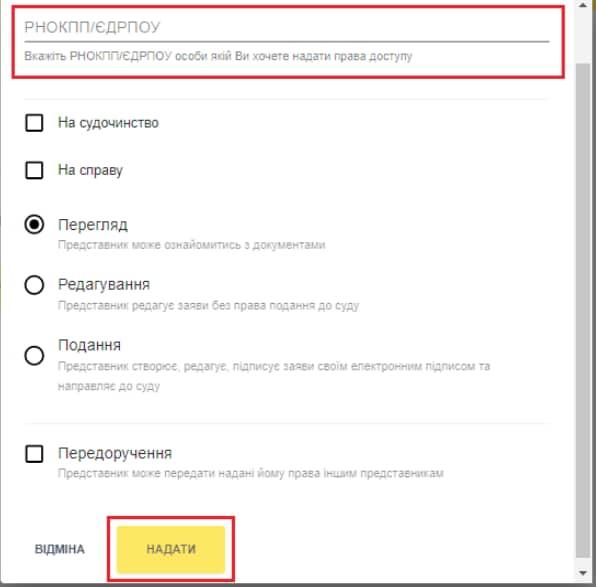
- enter the Taxpayer Identification Number of the natural person of the representative
- select the powers of the representative (viewing, editing and submitting documents, further delegating) and click "PROVIDE" and then "SIGN" with QES.
In case of any questions, PwC Legal Ukraine specialists are ready to help.


